
For years, Google Search Console only told you half the story: how your website performs in Google Search. But your customers do not just find you through your website anymore — they find your Instagram Reels, your TikToks, your YouTube videos, and your X posts sitting right in the search results. On July 7, 2026, Google finally closed that measurement gap. With the launch of Google Search Console platform properties, you can now track exactly how your social media content performs on Google Search — which queries surface your posts, how many people see them, and how many click. Here is what launched, why it matters for your social media SEO, and how to set it up in about five minutes.
Platform properties are one of two major Search Console additions in 2026. The other is the Generative AI report, which shows how often your pages appear in AI Overviews and AI Mode; we covered it in a separate screenshot walkthrough of the Search Console Generative AI report.
What Are Platform Properties in Google Search Console?
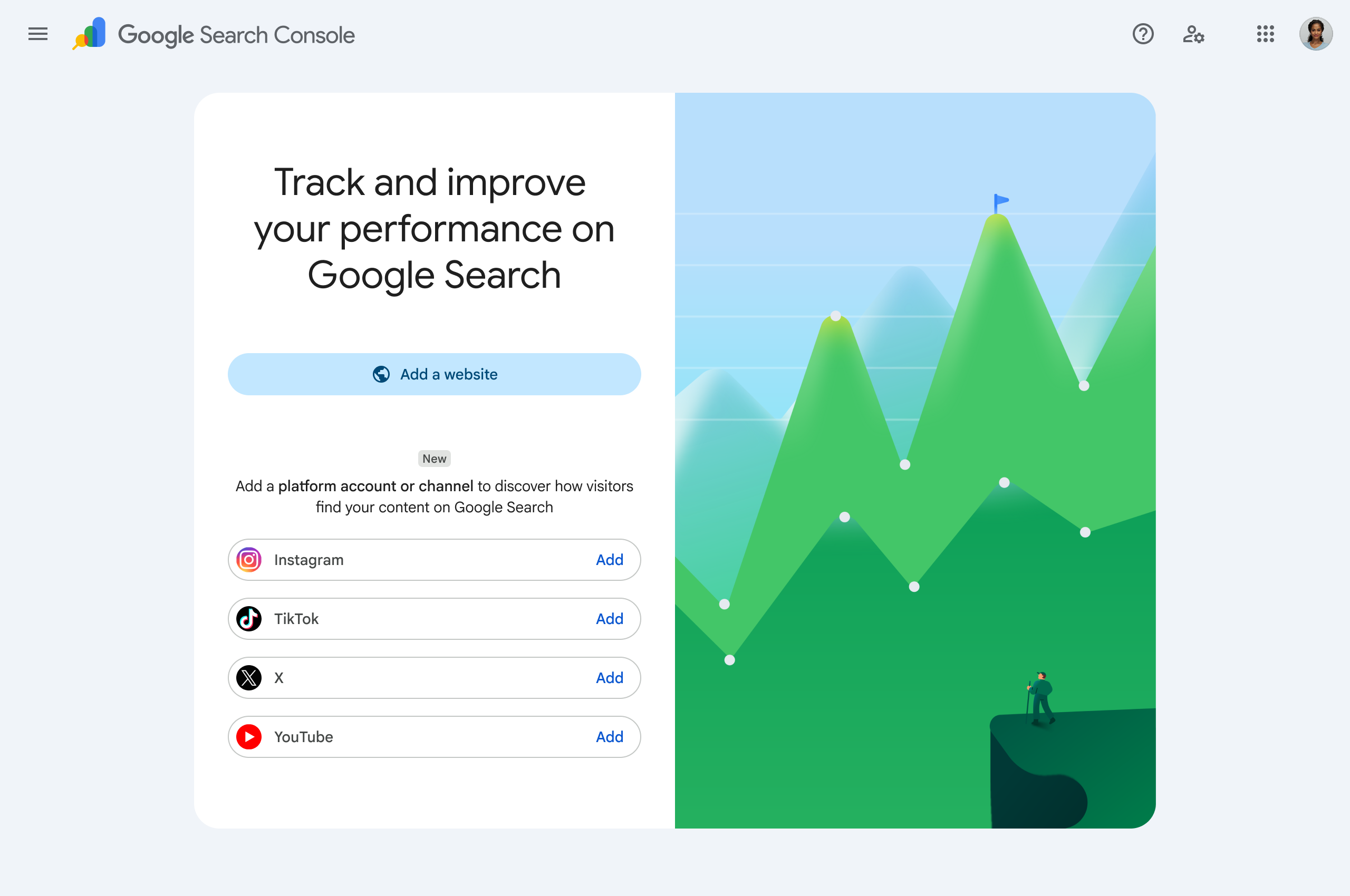
Platform properties are a brand-new property type in Search Console. Alongside your website, you can now add your social and video accounts as their own trackable properties and see how that content performs on Google Search and Discover. Google supports four platforms at launch:
- Instagram — profiles and posts (including Reels) that appear in Google results
- TikTok — your account and videos surfacing in Search
- X (Twitter) — your profile and posts
- YouTube — your channel and every video on it
The part most people missed: you do not even need a website. Google made platform properties available to creators and businesses with no site at all — a first for Search Console.
What You Can Actually See
Once a platform property is verified, you get three reports — and they mirror the tools website owners have relied on for years:
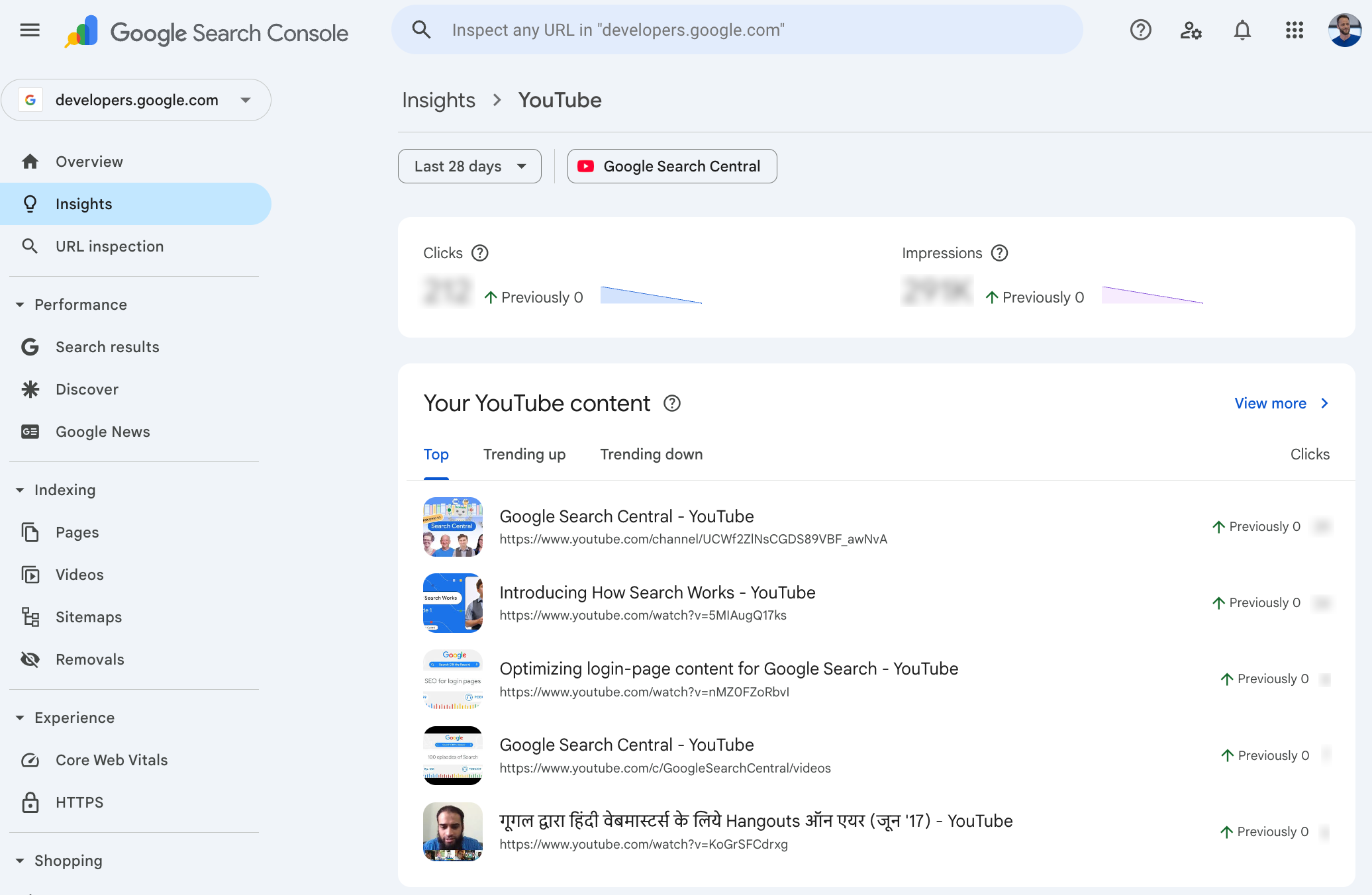
- Performance report — total clicks, impressions and more, filterable down to the exact posts and search queries driving traffic. You can export everything if you want to analyze it elsewhere.
- Insights report — a high-level view of recent traffic trends, your top-performing posts, and how people discover your account on Google.
- Achievements — milestone tracking, like crossing a new threshold of total clicks from Google Search in the last 28 days.
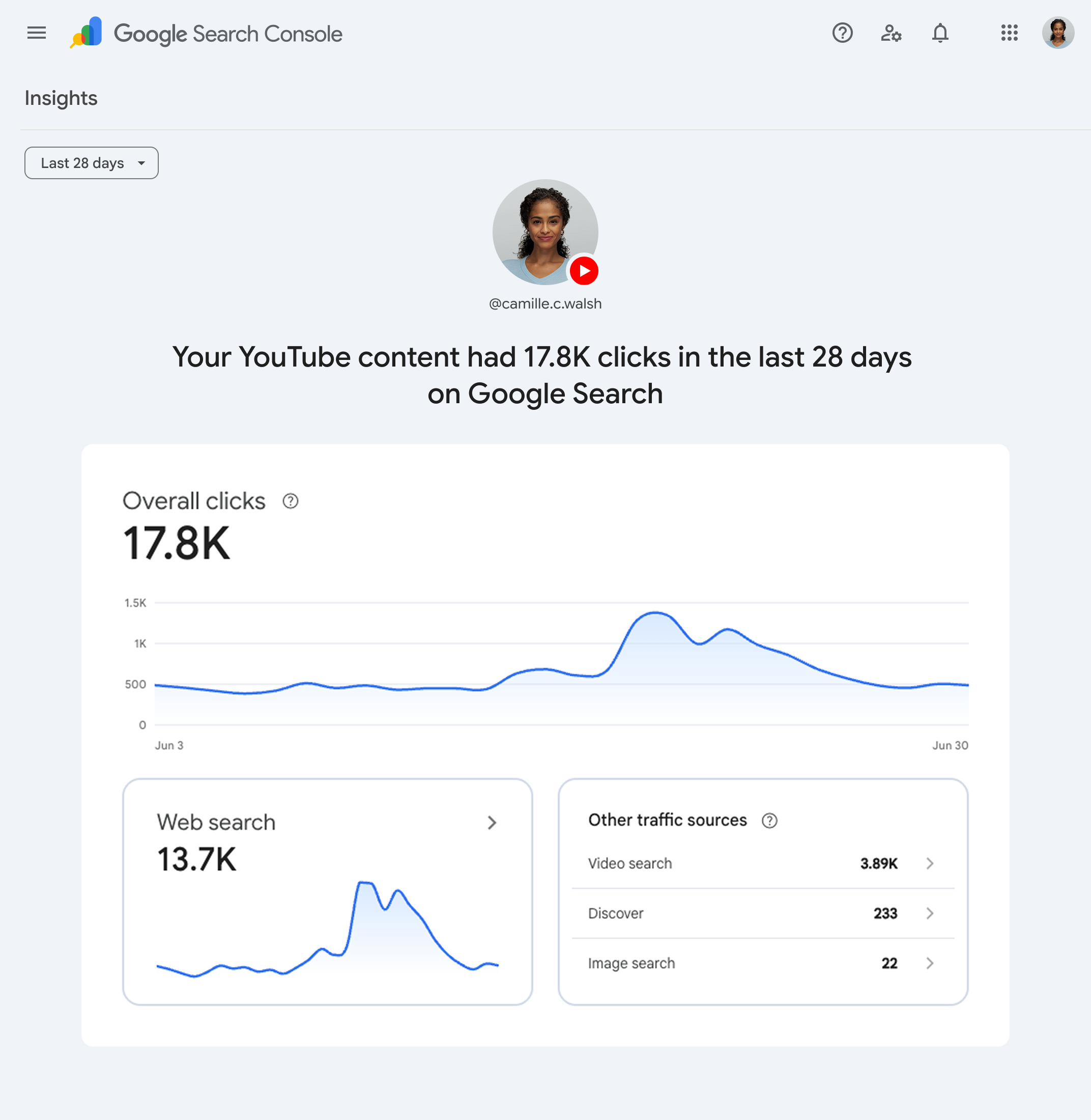
In practical terms: for the first time, a small business can see that the query “how to fix a leaking water heater” sent 400 people to its TikTok last month — data that used to be completely invisible. Platform analytics tell you how content performs inside the app. Search Console now tells you how it performs on Google, which is a completely different audience at a completely different moment of intent.
Your social content has been ranking on Google all along. Now you finally get to see the receipts.
Why This Is a Big Deal for Social Media SEO
Google has spent the last few years pulling more social and video content into results — short-video carousels, forum and social results, profile knowledge panels. People increasingly search for firsthand perspectives, and Google increasingly answers with Instagram, TikTok and YouTube content. That made social media SEO a real discipline: optimizing captions, titles and profiles so social content ranks for real searches.
The problem? You could never measure it. Instagram will not tell you what Google queries surfaced your Reel. Now Search Console will. That changes how smart businesses approach content:
- Keyword data for social content. See the exact queries that surface your posts — then make more content answering those searches, with the phrasing people actually use.
- Platform-level ROI. If YouTube drives 10x the Google clicks that X does, you finally know where your effort belongs.
- One dashboard for total search presence. Your website, your videos and your social profiles — measured side by side, the way Google actually sees your brand.
- Proof for the skeptics. If you have ever wondered whether posting consistently “does anything,” there is now a number for that.
How to Set Up Platform Properties (5 Minutes)
Open Google Search Console
Sign in at search.google.com/search-console with the Google account that manages your business. If you already use Search Console for your website, you are in the right place.
Click “Add property”
Open the property selector drop-down in the top-left corner and click “Add property,” or head to the verification page directly. You will see the new option: “Add a platform account or channel.”
Pick your platform
Choose Instagram, TikTok, X or YouTube. You can add each account you manage as its own property — so a business with a YouTube channel and an Instagram gets a property for each.
Verify ownership
Follow the on-screen steps to securely authorize the connection to your account. Once verified, data starts flowing into your Performance and Insights reports.
Heads up: Google is rolling platform properties out gradually over several weeks from the July 7 announcement. If you do not see the option yet, check back — it is coming to every account.
How Small Businesses Should Use This Data
Data is only useful if it changes what you do on Monday morning. Here is the playbook we recommend once your platform properties are verified:
- Mine the queries first. The search terms leading people to your social content are customer language, verbatim. Fold them into your video titles, captions, website pages and Google Business Profile.
- Double down on the winning format. If how-to YouTube videos pull Google clicks and X posts pull nothing, your content calendar just wrote itself.
- Fill the gaps deliberately. Queries where your social ranks but your website does not are page ideas Google has pre-validated for you.
- Optimize like it is SEO — because it is. Descriptive titles, keyword-aware captions, complete profiles. Instagram SEO, TikTok SEO and YouTube SEO all follow the same rule: say clearly what the content is about, using the words your customers search.
- Watch it monthly, not daily. Like all search data, trends matter more than day-to-day noise. A monthly review alongside your website’s numbers is plenty.
If you are already tracking your website in Search Console and your customer journey in GA4, this is the missing third leg. We wrote a full guide on attribution tracking across Google Business Profile and GA4 that pairs perfectly with this new data.
A Quick Timeline: From Experiment to Launch
- December 2025 — Google quietly tested “social channels” inside the Search Console Insights report for a limited set of websites, showing clicks, impressions and trending queries for auto-detected social profiles.
- July 7, 2026 — the experiment graduated into full platform properties: dedicated Instagram, TikTok, X and YouTube properties with Performance reports, Insights and Achievements — available even without a website.
The direction is unmistakable: Google is treating your social presence as a first-class part of your search presence. Businesses that connect the dots between their website SEO, their social media strategy and their Google Business Profile will compound wins across all three — while competitors keep treating them as separate worlds.
Want Your Whole Search Presence Working Together?
Website, social, maps and content pulling in the same direction — that is what actually moves the needle. We will audit how your business shows up across Google and hand you a clear plan, free.
Free audit • No obligation • From the team at Elevated Ideas
Common Questions
Platform Properties FAQs
What are platform properties in Google Search Console?
Platform properties are a new Search Console property type, launched July 7, 2026, that let you track how your Instagram, TikTok, X and YouTube content performs on Google Search and Discover. You get a Performance report with clicks, impressions and queries, an Insights report with trends and top posts, and Achievements that mark growth milestones.
Do I need a website to use platform properties?
No. For the first time, Search Console is open to creators and businesses without a website. You can verify a social account or channel on its own and see how that content performs in Google Search, no site required.
Which social media platforms does Search Console support?
At launch, four platforms are supported: Instagram, TikTok, X (formerly Twitter) and YouTube. Each account or channel is added and verified as its own property inside Search Console.
Why don’t I see platform properties in my Search Console yet?
Google is rolling the feature out gradually over the weeks following the July 2026 announcement, so it may not appear in every account immediately. Keep checking the Add Property menu — the option shows up automatically once your account is included in the rollout.
How is this different from Instagram or TikTok analytics?
Native platform analytics show how your content performs inside the app — feeds, followers and the For You page. Search Console shows how that same content performs on Google: which search queries surface it, how often it appears, and how many people click through. It is a different audience, discovered at a moment of active searching, and that data was previously invisible to creators.
Does social media content really rank in Google search results?
Yes — and increasingly so. Google surfaces short-form video carousels, social profiles and individual posts for many searches, especially how-to, local and brand queries. That is exactly why Google built this feature: social content earns real search traffic, and now businesses can measure and optimize it like any other SEO channel.