
Most local businesses pour money into paid ads, social media campaigns, and website redesigns to climb the local search rankings. But there is a completely free tactic hiding inside your Google Business Profile that almost nobody talks about: custom services. Adding detailed, keyword-rich custom services to your GBP can reshape how Google understands your business, which searches you appear in, and how far your visibility reaches on the map. We tested this strategy with a real client in Springfield, Illinois, and the local SEO heatmap results were striking. Here is exactly how it works, why it matters, and how you can replicate the results for your own business.
What Are Custom Services in Google Business Profile?
Google Business Profile allows every business to list the services they offer. When you first claim your profile, Google may auto-suggest a handful of generic services based on your primary business category. But most business owners never go beyond those defaults.
Custom services are the services you manually add to your profile, ones that go beyond what Google suggests. Instead of listing just “plumbing” as a service, you can add entries like “emergency sewer line repair,” “tankless water heater installation,” or “bathroom remodel plumbing.” These custom entries give Google far more context about what your business actually does, and that context directly influences which searches trigger your listing.
Think of custom services as a free-form opportunity to tell Google exactly what you specialize in. Unlike your business description, which has a limited impact on ranking, the services section is actively indexed and factored into Google’s local algorithm. Every service you add becomes another potential keyword match between your profile and a searcher’s query.
“Custom services are the closest thing to free local SEO keywords that Google Business Profile offers. Every entry you add is another doorway into local search results.”
The difference between a GBP with five generic services and one with thirty detailed custom services is enormous. The detailed profile communicates relevance across a much wider set of search terms, and Google rewards that relevance with broader visibility in both the local pack and Google Maps.
How Custom Services Affect Google’s Local Algorithm
Google’s local search algorithm weighs three primary factors: relevance, distance, and prominence. Custom services directly influence the first factor, relevance, by telling Google precisely what your business offers.
When a user searches for “foundation crack repair near me,” Google scans local business profiles for signals that match. If your GBP lists “foundation crack repair” as a custom service, you have a direct relevance signal that competitors without that service entry simply do not have. This is not speculation. Google’s own documentation states that detailed and complete business information helps match your profile to the right searches.
Beyond direct keyword matching, custom services also help Google understand your business at a semantic level. When you list a cluster of related services, such as “French drain installation,” “basement waterproofing,” and “crawl space encapsulation,” Google recognizes that your business has deep expertise in water management. This semantic grouping can help you rank for related searches that you did not explicitly list, because Google understands the topical authority your profile demonstrates.
Custom services also contribute to the completeness score of your profile. Google has consistently favored profiles that are fully filled out across every available field. Businesses that leave the services section empty or barely populated are leaving ranking power on the table, especially in competitive local markets where every small advantage matters.
Springfield IL Heatmap Case Study: Before and After
To demonstrate the real-world impact of custom services on local search optimization, we ran a controlled test with a service-based business in Springfield, Illinois (Sangamon County). The business was already performing decently in local search, ranking in the top three for their primary keyword within a two-mile radius of their location. But beyond that radius, visibility dropped dramatically.
The Before Snapshot
Using a local SEO heatmap tool, we mapped the business’s visibility across a grid covering the greater Springfield area. The heatmap showed strong green rankings (positions one through three) directly around the business address, but the map quickly shifted to yellow (positions four through seven) and then red (positions eight or lower) as the grid extended outward. The business was essentially invisible to searchers more than three miles away.

At this stage, the Google Business Profile had only six services listed, all auto-suggested by Google based on the business category. The descriptions were minimal, and none included location-specific language.
What We Changed
We added twenty-eight custom services to the profile over the course of a single afternoon. Each service was carefully crafted to include specific service names that real customers search for, natural variations of key phrases, and location-relevant language where appropriate. We did not stuff keywords or create duplicate entries. Every service was a legitimate offering that the business could fulfill.
We also restructured the existing services with more detailed descriptions, adding context about the process, benefits, and situations where each service applies. The total time investment was approximately two hours of research and data entry, and the cost was zero dollars.
The After Snapshot
Thirty days after implementing the custom services, we ran the same heatmap analysis. The results were significant. The green zone (top three rankings) had expanded from a two-mile radius to nearly a five-mile radius. Yellow positions (four through seven) now extended across most of the Springfield metro area, and the red zones had retreated to the outer edges of the grid. For several high-value search terms, the business went from not ranking at all to appearing in positions two through five.
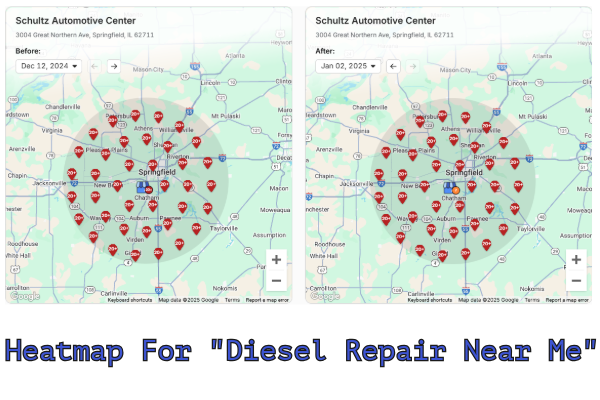
“After adding twenty-eight custom services to this Springfield business’s GBP, their top-three visibility radius expanded from two miles to nearly five miles in just thirty days, without spending a single dollar on ads.”
The business owner reported a noticeable increase in phone calls and direction requests from Google Maps within the first three weeks. These were not vanity metrics. They were real leads from people who found the business through searches that previously returned competitor listings. This is the power of strategic Google Business Profile management.
Step-by-Step Guide: Adding Custom Services to Your GBP
STEP 1
Log Into Your Google Business Profile
Navigate to business.google.com and sign in with the Google account that manages your business listing. If you manage multiple locations, select the specific location you want to optimize. Click on “Edit Profile” and then navigate to the “Services” section in the profile editor.
STEP 2
Audit Your Current Services
Before adding new services, review what is already there. Delete any auto-suggested services that are too generic or do not accurately represent your offerings. A service labeled “consulting” tells Google almost nothing. You want specificity. Make a list of every service your business actually provides, including niche specialties and seasonal offerings that you might not think to advertise.
STEP 3
Research Search Terms Your Customers Use
Open Google and start typing your services into the search bar. Pay attention to the autocomplete suggestions, because those represent real search queries with actual volume. Also check the “People also ask” section and the related searches at the bottom of the results page. These queries should inform how you name and describe your custom services. Tools like Google Keyword Planner and Google Trends can also reveal the language your potential customers are using.
STEP 4
Create Detailed Service Entries
For each service, provide a clear name and a thorough description. The name should match the way customers search for that service, not internal jargon. For example, use “AC repair and maintenance” instead of “HVAC unit servicing.” In the description field, explain what the service includes, who it is for, and what problems it solves. You have up to three hundred characters for each description, so use them wisely.
STEP 5
Add Pricing When Possible
Google allows you to add pricing to your services, and profiles with pricing information tend to generate more engagement. Even if your pricing varies, adding a “starting at” price or a price range gives potential customers useful information and signals to Google that your profile is more complete than competitors who skip this field.
STEP 6
Organize Services Into Logical Categories
GBP allows you to group services under custom section headers. Use this to create a logical structure that mirrors how customers think about your offerings. A landscaping company might group services under headers like “Lawn Maintenance,” “Hardscaping,” and “Seasonal Services.” This structure helps both Google and potential customers understand the full scope of what you do.
STEP 7
Save and Monitor Changes
After adding your services, save the profile and check back within forty-eight hours to confirm everything published correctly. Google occasionally rejects or modifies service entries, so verify that your custom services appear exactly as you wrote them. Set a reminder to review and update your services quarterly.
Niche-Specific Services That Drive Rankings
The more specific your services are to your particular niche, the more ranking power they carry. Generic services create generic visibility. Niche services create targeted visibility for the exact customers you want to attract. Here are examples across several industries:
- Dental Practices: Instead of “dental services,” list entries like “same-day dental crowns,” “Invisalign clear aligner treatment,” “pediatric dental sealants,” and “emergency toothache relief.”
- HVAC Companies: Replace “heating and cooling” with “mini-split heat pump installation,” “ductwork replacement and sealing,” “smart thermostat setup,” and “commercial rooftop unit repair.”
- Law Firms: Move beyond “legal services” to “contested divorce representation,” “DUI defense and license reinstatement,” “small business formation and LLC filing,” and “workers compensation claims.”
- Auto Body Shops: Instead of “auto repair,” add “paintless dent removal,” “insurance claim collision repair,” “classic car restoration,” and “bumper replacement and refinishing.”
- Home Cleaning: Replace “cleaning services” with “move-out deep cleaning,” “post-construction cleanup,” “recurring weekly house cleaning,” and “Airbnb turnover cleaning.”
The pattern is clear: specificity beats generality every time. Each detailed service entry acts as a unique ranking opportunity that brings your profile closer to the exact language potential customers are typing into Google.
Using Location Keywords in Your Services
While you should avoid blatant keyword stuffing, strategically incorporating location-relevant language into your service descriptions can amplify your local search performance. This works because Google cross-references the content in your GBP with location signals to determine geographic relevance.
For the Springfield client in our case study, we included natural location references in several service descriptions. Instead of “roof repair services,” the description read “roof repair for homes and businesses in the Springfield metro area, including storm damage assessment and insurance claim assistance.” The location reference is natural, informative, and adds geographic context without sounding forced.
Here are some effective approaches to location integration:
- Reference your service area: “Serving homeowners throughout Sangamon County and surrounding communities.”
- Mention relevant landmarks or regions: “Available for properties in downtown Springfield, the west side, and Lake Springfield neighborhoods.”
- Include county or metro area names: These broader geographic terms help capture searches from users in adjacent areas who may not search by city name.
The key is to keep location references useful and natural. Google’s spam detection can identify and penalize profiles that over-optimize with location terms, so focus on one or two location mentions per service description rather than cramming every service with your city name.
Local Ranking Factors: Where Services Fit In
Custom services do not operate in isolation. They are one component of a broader local SEO strategy that determines where your business appears in search results. Understanding how services interact with other ranking factors helps you prioritize your optimization efforts.
- Google Reviews: The quantity, quality, and recency of your reviews remain the most powerful local ranking factor. Custom services amplify the effect of reviews by ensuring your profile is relevant for the searches those reviewers might mention.
- NAP Consistency: Your business name, address, and phone number must be identical across every online directory. Inconsistent NAP data undermines all other optimization work, including custom services.
- Website Quality: Google evaluates your linked website for relevance and authority. Ideally, your website should have dedicated pages for each major service you list in your GBP, creating a consistency loop between your profile and your site.
- Google Business Profile Completeness: Services are part of the completeness score. A fully completed profile, including photos, business hours, attributes, products, and services, outperforms a partially completed one in virtually every scenario.
- Engagement Signals: Click-through rates, direction requests, phone calls, and website visits from your GBP all feed back into Google’s assessment of your profile’s value. More relevant services lead to more relevant traffic, which generates stronger engagement signals.
Custom services work best when they are part of a comprehensive SEO strategy that addresses all of these factors. They are not a silver bullet, but they are one of the highest-impact, lowest-effort tactics available to local businesses today.
Common Mistakes to Avoid
Adding custom services is straightforward, but there are several pitfalls that can diminish their effectiveness or even harm your profile:
- Keyword Stuffing: Listing services like “plumber Springfield IL best plumber Springfield plumbing” is spam. Google can detect this pattern and may suppress your listing or flag your profile for review.
- Duplicate Services: Adding the same service with slight wording variations, such as “lawn mowing,” “lawn cutting,” and “grass mowing,” dilutes your profile rather than strengthening it. Each entry should represent a distinct service.
- Listing Services You Do Not Offer: It might be tempting to add popular services that drive search volume, but if customers contact you for services you cannot provide, the negative experience will result in poor reviews and wasted leads.
- Ignoring Descriptions: Adding service names without descriptions is a missed opportunity. The description field provides additional keyword signals and helps convert browsers into callers.
- Setting and Forgetting: Your services should evolve as your business evolves. New offerings, seasonal services, and industry trends should all be reflected in your GBP services list. Review your services at least once per quarter.
- Using Internal Jargon: Your service names should match how customers search, not how your industry talks. “HVAC preventive maintenance agreement” means nothing to a homeowner searching for “AC tune-up.”
Measuring Your Results
After adding custom services, you should track several metrics to gauge their impact on your local search performance:
- GBP Insights: Google provides data on how many searches triggered your profile, how many people viewed it, and what actions they took. Compare your monthly insights before and after adding custom services to quantify the difference.
- Local SEO Heatmaps: Tools like Local Falcon, BrightLocal, and Local Viking allow you to map your rankings across a geographic grid. Running heatmap reports on a monthly basis gives you a visual representation of how your visibility is expanding or contracting.
- Phone Calls and Form Submissions: Track the volume and source of your incoming leads. If your GBP is generating more calls and direction requests after adding custom services, the strategy is working.
- Keyword Rankings: Use a local rank tracking tool to monitor your positions for the specific terms you targeted with your custom services. Pay attention to both your local pack rankings and your organic positions.
- Competitor Analysis: Periodically check what services your top-ranking competitors are listing. If they start adding custom services in response to your gains, you will need to continue iterating and refining your own entries to maintain your advantage.
If you want to see exactly where your business stands in local search right now, request a free heatmap audit from Elevated Ideas. We will map your current visibility and show you exactly where custom services and other GBP optimizations can make the biggest difference.
Free tool: Make leaving a review one-tap easy with our free Google review link generator.
See Your Local Rankings On a Heatmap
We will run a free local SEO heatmap audit for your business, show you exactly where you rank across your service area, and identify the custom service opportunities that can expand your visibility without spending a dollar on ads.
Get Your Free Heatmap Audit →No obligation. No credit card. Just actionable data you can use immediately.
COMMON QUESTIONS
Local Search FAQ
What are custom services in Google Business Profile?
Custom services are service entries that you manually add to your Google Business Profile beyond the default suggestions Google provides. They allow you to describe your specific offerings in detail, giving Google more context about what your business does and helping your profile match a wider range of relevant local searches.
How many custom services should I add to my GBP?
There is no strict limit, but most businesses benefit from listing between fifteen and forty custom services. The key is that every service must be a legitimate offering. Focus on covering every distinct service you provide, including niche specialties and seasonal services that differentiate you from competitors.
How long does it take to see results from adding custom services?
Most businesses begin to see measurable changes in their local search visibility within two to four weeks of adding custom services. In our Springfield case study, noticeable heatmap improvements appeared within thirty days. However, the full impact can continue to build over two to three months as Google re-indexes and re-evaluates your profile.
Can custom services help me rank in cities outside my immediate location?
Yes. While distance remains a core ranking factor, increasing your relevance through detailed custom services can extend your visibility radius. In our case study, top-three rankings expanded from a two-mile to a nearly five-mile radius, effectively reaching neighboring communities that were previously out of range.
Is it okay to include location names in my service descriptions?
Yes, as long as you do it naturally and sparingly. Including one or two references to your city, county, or service area within service descriptions adds geographic context that can boost local relevance. Avoid stuffing every description with location keywords, as Google may flag this as spam.
Do custom services affect my Google Maps rankings?
Yes. Google Maps and the local pack both pull from your Google Business Profile data. When your custom services create stronger relevance signals for a given search, your profile is more likely to appear in both the map results and the three-pack that appears in standard search results.
What is a local SEO heatmap and how does it work?
A local SEO heatmap is a visual tool that checks your Google ranking from dozens of geographic points across your service area. Each point on the grid shows your ranking position for a specific keyword, color-coded from green (top three) to red (low or not ranking). This reveals exactly where your business is visible and where it disappears, making it easy to measure the impact of optimizations like adding custom services.
Should I hire someone to manage my Google Business Profile services?
You can add custom services yourself in a few hours, but working with a professional ensures your entries are strategically optimized for the right keywords, properly structured, and part of a larger local SEO strategy. At Elevated Ideas, our GBP management service handles this alongside reviews, posts, and ongoing optimization for sustained ranking improvements.
Written by Ryan Mason, Founder of Elevated Ideas — helping local businesses dominate search through data-driven strategy, heatmap analysis, and hands-on Google Business Profile optimization.